Netease has released a High/Low-Resolution Resource Pack for Marvel Rivals in the form of free DLC.
The high-resolution resource pack will be downloaded by default when players download Marvel Rivals. It offers the best visuals for the hero shooter, though it does come with a hefty 36 GB of data to download.
Players can choose which resource pack to use to suit their device’s performance and needs.
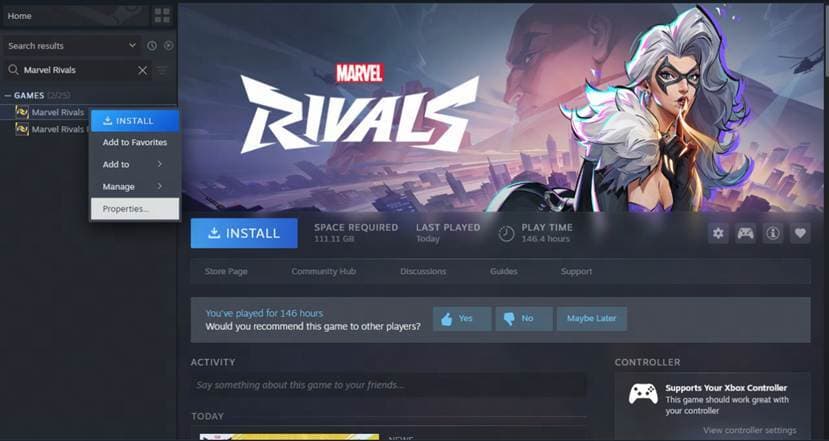
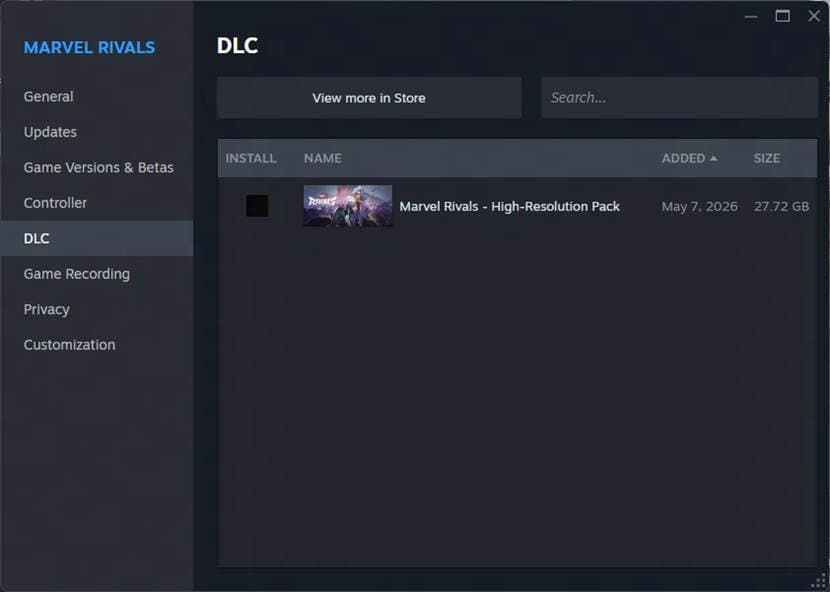
The low-resolution resource pack is what is included in the base game, so to use it, players will essentially have to disable the high-resolution resource pack on Steam. This is pretty easy to do — just right-click on Marvel Rivals in your library, go to Properties, navigate to DLC, and uncheck the high-resolution pack. For players who already had Marvel Rivals downloaded before today, they’ll need to go to the same page to enable the DLC and download the additional resources.
If the DLC isn’t enabled, then Marvel Rivals will automatically use the low-resolution resource pack.
Netease shared a few pictures of this process to further help players, which can be viewed below:

The HD resource packs come as Season 8 of Marvel Rivals launched today, introducing the newest Vanguard, Devil Dinosaur, to the game. For more information about the changes and what else the beginning of Season 8 brings, check out the patch notes and balance adjustments here.
While Marvel Rivals is available on PlayStation 5 and Xbox Series X|S, the high-resolution resource pack and low-resolution resource pack are available for PC players only.